Top-level content types that act as the landing page and home base for an entire section of ithaca.edu

Created by the Web Team and built out with content nested underneath.

Understanding Sites and Departments

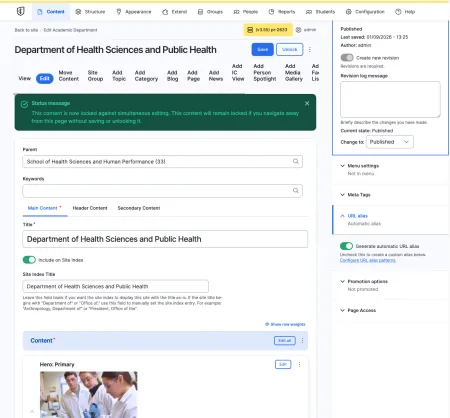
Example of an editing page for the Department of Health Sciences

A Site, an Academic Department, and an Academic Program are all top-level container content types. Each one serves as the landing page and home base for a section of ithaca.edu, with the rest of that section's content nested underneath it. They are built and edited the same way, and all three are created by the Web Team. The only meaningful differences are what each one represents, who can edit it, and which content types can live beneath it.

Because they work almost identically, this page covers all three together. The shared behavior is described first, and the differences are listed at the end.

How these content types work

Each of these content types sits at the top of its own section. Other content, such as Pages, Topics, and Media Galleries, is created underneath it and inherits the section's navigation and shared elements. You set those shared elements once, on the Site, Department, or Program itself, and they carry down to every page beneath it.

These are created by the Web Team

You cannot create a new Site, Academic Department, or Academic Program yourself. New top-level sections must be set up by a member of the Web Team. If your unit needs its own section of ithaca.edu, submit a request through Project Requests & Content Support. Once the section has been created, your team can edit its content like any other page.

The edit screen

When you open one of these content types in edit mode, the editing area is organized into tabs. Most editors will see two: Main Content and Secondary Content.

Main Content

The Main Content tab holds the body of the section's landing page.

The Title (required) is the name of the unit. It appears at the top of the page and is used to identify the section throughout the website. Most often these will follow the convention of "Department of XYZ", "Office of ABC", "Office for", etc.

The Content area (required) is the main building area of the page. You add and arrange components here (also called paragraphs), such as an Intro, a Hero, or a Blockquote. For a full list of available components and how each one works, see Paragraphs (Components).

Secondary Content

The Secondary Content tab holds two sets of links that persist across every subpage of the section, Social Links and Quick Links. Anything you set here appears not only on the landing page, but on every Page, Topic, and other piece of content nested beneath the section. You only need to set them once.

More information about Secondary Content can be found on the support guide for Social Links & Quick Links.

Header Content

Some editors will also see a Header Content tab. This tab is available to CMS Managers and controls the content shown at the top of the section's pages. If you do not see this tab, your role does not include access to it. Contact the Web Team if you need a change made to the header. For more on what each role can do, see Roles & Permissions.

To save your work, click Save at the top of the edit screen. For details on publishing, drafts, and viewing past versions, see Publishing States & Revisions.

Building out your section

A Site, Department, or Program is a top-level container for the rest of your content. Once it exists, you create the pages and other content that live beneath it, then arrange the section's navigation using its menu view. The exact menu view and the list of content types you can nest depend on which of the three you are editing, covered just below.

 SiteAcademic DepartmentAcademic Program
RepresentsA standalone unit, such as an office or a centerAn academic unit, such as a department, school, or centerA specific course of study, such as a major, minor, or graduate program
ExampleThe Center for Career Exploration and DevelopmentThe Department of Website Studies; the School of Humanities and SciencesA degree or certificate program within a school or department
Who can editCMS Authors, CMS Managers, AdministratorsCMS Authors, CMS Managers, AdministratorsCMS Managers and Administrators only
Navigation menuSite MenuDepartment MenuProgram Menu

What can be nested beneath each

The content types you can create underneath each one differ slightly.

A Site can contain: Topic, Category, Blog, Page, Academic Program, News, IC View, Person Spotlight, Media Gallery, Simple Full Width Page, and Faculty / Staff Listing.

An Academic Department can contain: Topic, Category, Blog, Page, News, IC View, Person Spotlight, Media Gallery, and Faculty / Staff Listing.

An Academic Program can contain: Topic, Category, Page, Media Gallery, and Academic Department.