Cleaner Previews, Longer Intros, and New Editor Safeguards

By Web Team, November 11, 2026
A roundup of what’s new: cleaner component previews, longer intro text, checks that catch common mistakes before you save, and fixes across Program Search, accordions, links, and header images.

A roundup of what’s new: cleaner component previews, longer intro text, checks that catch common mistakes before you save, and fixes across Program Search, accordions, links, and header images.

This roundup covers our two most recent releases. Together they make editing screens easier to scan and help catch common mistakes before you save. As always, your existing pages and content stay exactly as they are.
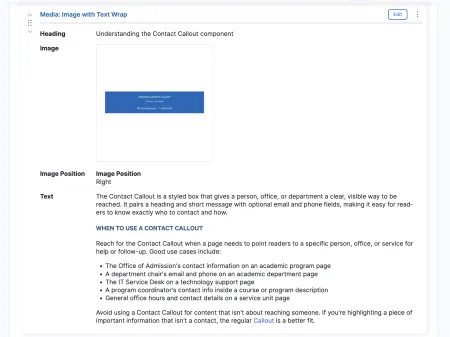
New: Cleaner previews when you edit

screenshot of the preview interface in Drupal, which we've cleaned up

When you edit a page, every component now previews in a clean, consistent layout with labeled fields. Only the most relevant fields show before you select “Edit,” so long pages are easier to scan.

More room for intros

Intro Text and Section Intro Text now allow up to 350 characters.

New: Safeguards in the text editor

The editor now checks for a few common problems when you save. It flags a Heading 4 that sits on its own and tables made up only of header cells, since both confuse screen readers. Standalone CTA buttons now need a real link. If a page you manage already has one of these, you may be asked to fix it the next time you edit that page.

Two more helpful additions: text pasted from Word or a PDF now comes through cleaner, and the jump-to-error links in content error messages now bring you to the correct field.

Accessibility improvements

Program Search filters now show a clear outline around the whole checkbox and label for keyboard users. Mobile accordions have a larger tap area, more consistent spacing, and better-aligned plus and minus icons.

A few other improvements

  • In Program Search, the “Reset Search and Filters” button works again and the Area of Study filter returns the right results.
  • Department and program pages show their header background images again.
  • Links that contain an ampersand (&) now work correctly in buttons, cards, in-text links, and callouts.
  • On the homepage, IC Highlights headings now link directly instead of showing separate link text, and the “Latest Stories” link is fixed.
  • You can now embed Blackbaud counters with the embed component.
  • Most images and videos now load only when needed, which helps pages load faster.
  • New dining cards show information pulled automatically from Nutrislice.
  • Editors who manage Featured Intercom posts now only see posts from the last 90 days.
  • Behind the scenes, we applied security updates, added protection against malicious traffic, fixed scheduled tasks, and updated our code tools.

Questions or need a hand?

We're happy to help. Reach out through Project Requests & Content Support or get in touch with Our Team via the email below.