Over the past few weeks we've shipped a series of improvements to the editing experience. As always, your existing pages and content stay exactly as they are. Here's what's new, grouped by what you're most likely to notice.
Draft Sharing, Callouts Updates, and Media Gallery Updates
By Web Team, July 27, 2026
A roundup of what's new across our July releases: friendlier colors, cleaner cards, media gallery headings, the return of draft sharing, and more.
Callouts, colors, and buttons
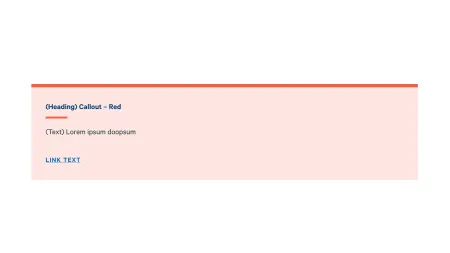
Callouts now have a new Medium Blue color option, giving you one more on-brand way to highlight helpful information. There's also a new Alert Callout for the occasional time-sensitive or especially important message. Just like the red and yellow callouts, Alert Callouts are available only to administrators, so when one does appear, it really stands out. Callout, alert, and call-to-action (CTA) colors have also been refreshed for better contrast and readability, along with updated link colors and clearer hover and focus styles on CTA buttons.
Cleaner cards and expanded character counts
Spacing in card collections, including stacked card collections, has been tidied up for a more even, polished layout. And if you add a <nolink> to a card's link field, the card now correctly displays with no link and a normal cursor.
Some fields now give you more space: the contact callout and split media tile text fields accept up to 350 characters. A couple of others have gentle new limits to keep layouts looking their best, the Standalone CTA Button is capped at 64 characters, and the description on a Card: Text is capped at 280 characters.
Media gallery headings show more consistently
When you add a media gallery to a page, topic, or site, its intro heading and subheading now appear reliably. This applies to galleries you place on pages, topics, and sites; individual Media Gallery pages aren't affected.
Restored "temporary unpublished access" functionality
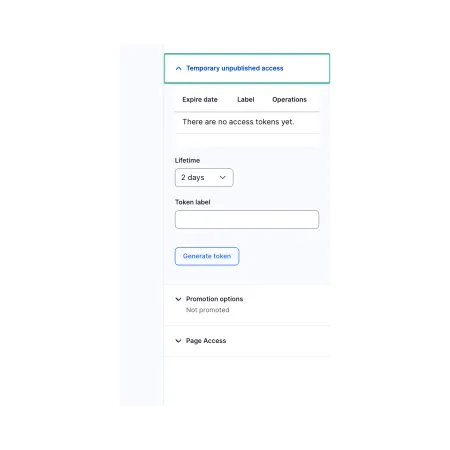
You can once again share a draft (unpublished) version of a page with someone who isn't logged in. Just open the draft's editing page, locate the Temporary Unpublished Access settings in the right-hand menu, add a token, and copy the link to share.
A few other improvements
The Latest Blogs and Category list paragraphs now display for everyone, and they'll no longer surface unpublished content. You can see them in action on the Content Demo. We've also added support for an additional style of Blackbaud donation form, and fixed navigation dropdowns so they no longer get cut off near the right edge of the screen.
Behind the scenes, menu logos and social links have been given a fix for consistency, and link fields will gently stop accidental local file paths (like C:/... or /Users/...) from being saved.
Questions or need a hand?
We're happy to help, reach out through Project Requests & Content Support or get in touch with Our Team via the email below.