Feed: Latest Blogs

Displays a feed of the most recent blog posts.

Understanding the Feed: Latest Blogs component

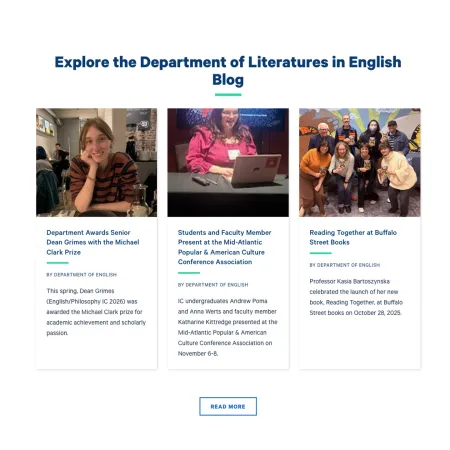
Example image of the Feed: Latest Blogs component.

The Feed: Latest Blogs component automatically displays the three most recent posts from a blog you choose. You point it at a single blog by name, and it pulls in those posts for you. When a newer post is published to that blog, the feed updates on its own, so you never have to come back and swap the posts out by hand.

When to use Feed: Latest Blogs

Reach for this component when you want a page to show fresh, automatically updating blog content without any ongoing upkeep. Good use cases include:

  • Highlighting a department's blog on its main landing page
  • Surfacing recent posts from a faculty or program blog on a profile
  • Keeping a topic or custom landing page tied to the latest writing from a related blog
  • Giving visitors a quick path to your newest posts alongside a short introduction

Avoid using this component when you want to feature specific, hand-picked posts rather than the most recent ones, or when you want to pull from more than one blog at a time. Because it always shows the three newest posts from a single blog, you cannot choose individual posts or reorder them. If you want the most recent news articles instead of blog posts, the Feed: Latest News component is usually a better fit.

What the feed pulls in

The feed always shows the three most recent posts from the blog you select, newest first. You do not pick the individual posts; the component chooses them automatically based on their publish date. There is nothing to update when new posts go live.

Adding and modifying Feed: Latest Blogs

Collection Heading (optional)

The Collection Heading is the title that appears above the feed. Use it to tell visitors what they are looking at, such as "From the Physics Blog" or "Latest from Admissions." This field is limited to 60 characters, so keep it short and descriptive. If the component sits in a section that already has its own heading, you can leave this blank. It supports basic formatting; see the Text component for the full list of options.

Collection Intro Text (optional)

The Collection Intro Text is a short subheading that appears beneath the Collection Heading. Use it to add a sentence of context, such as a brief description of the blog or an invitation to read more. This field is limited to 130 characters. Like the heading, it supports basic formatting; see the Text component for details.

Link to Existing Blog (required)

The Link to Existing Blog field is how you choose which blog the feed pulls from. Start typing the name of the blog and a list of matching blogs will appear for you to select from. For example, typing "Wavelengths" will surface "Wavelengths: Physics News." Select the blog you want, and the component will automatically display its three most recent posts. You can connect only one blog at a time.

More Link (optional)

The More Link is an optional link you can add below the feed, usually pointing visitors to the full blog so they can read more posts. The URL is where the link goes: start typing the title of a piece of content to select it from the list, or enter an internal path (such as /node/123) or a full external web address (such as https://example.com). The Link text is the wording visitors see and click, such as "See all posts" or "Visit the Physics Blog." If you do not need a read-more link, you can leave both fields blank.

Supported content types:

  • sites,
  • academic programs,
  • academic departments,
  • topics,
  • profiles,
  • and custom landing pages.