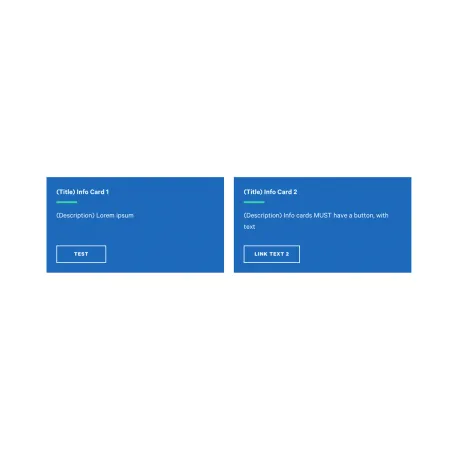
Card: Info

A bold, solid-color card with a title, short description, and a button.

Understanding the Card: Info

Example of the "Card: Info" card type.

The Card: Info is the most prominent card type. Each card has its own solid background color, a title, a short description, and a button, making it well suited to grouped calls to action. Like every card, it lives inside a Collection: Card Grid and sits alongside up to two other info cards in a row.

Two things set the info card apart from the others. Every info card always displays a button, so a link is required on each one, and each card can be given its own color rather than sharing a single style across the group.

When to use a Card: Info

Reach for a Card: Info when you want a set of bold, clearly clickable actions side by side. Good use cases include:

  • Calls to action such as "Apply Now," "Request Info," and "Schedule a Visit"
  • Key next steps for prospective students, each linking to the relevant page
  • Important quick links you want to stand out with color and a button

If you want the whole card to be clickable instead of showing a button, the Card: Text is a better fit. If a photo should lead the card, use the Card: Image, and if a single number is the point, use the Card: Statistics.

Adding and modifying a Card: Info

Inside a Collection: Card Grid, click "Add Collection: Info" to add a card, then fill in the fields below. You can add up to three info cards, and reorder them with the drag handle on the left of each card.

Collection Heading (optional)

The Collection Heading is the title displayed above the row of cards. Keep it short and descriptive, up to 60 characters.

Subheading (optional)

The Subheading is a short supporting line displayed beneath the Collection Heading, up to 130 characters. It only appears when you have entered a Collection Heading.

Card Color (required)

The Card Color sets the background color for that individual card, chosen from the dropdown. Available options are Bright Blue, Dark Blue, and Gray. Because the color is set per card, the cards in one collection can each be a different color, or all share the same one. 

Card Title (required)

The Card Title is the bold heading at the top of the card, up to 40 characters. Keep it short, such as the name of the action or resource.

Description (required)

The Description is a short line of supporting text below the title, up to 130 characters. It supports rich text formatting; see the Text component for the full list of options.

Link (required)

Every info card displays a button, so the Link is required and always renders as a button at the bottom of the card.

  • URL: Start typing the title of an existing page to search for and select it, or paste an internal path or a full external web address such as https://www.ithaca.edu. If you want the button to appear without linking anywhere, enter <nolink>. The button still displays, using the Link text as its label.
  • Link text: The label shown on the button, such as "Apply Now." This is required.
Looking for an example?

This component isn't available on standard pages. See it in context on the Topic Demo page of the Web Content Demo.