Hero: Section Intro

A secondary hero banner for page sections.

Understanding Hero: Section Intro

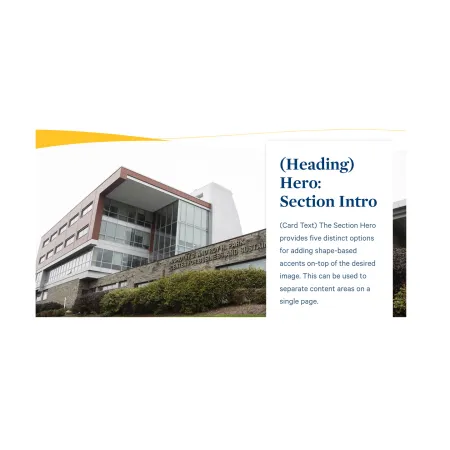
Example of the "Hero: Section Intro" paragraph / component with the optional card shown.

Example of this component with the optional card shown.

Hero: Section Intro is a full-width banner that pairs a large background image with a colored shape accent and an optional text card. It is designed to introduce a new section of a page or act as a stylized break between content areas, rather than as the main banner at the very top of a page.

When to use Hero: Section Intro

Reach for Hero: Section Intro when you want to visually separate one part of a page from another with a full-width image and a branded shape accent. Good use cases include:

  • Marking the start of a new section on a long custom landing page
  • Introducing a sub-topic within a site section with a short headline and supporting sentence
  • Creating a visual break between content areas on an academic program or department page
  • Adding a section banner on a news article that points readers to a related page

Avoid using Hero: Section Intro as the primary banner at the very top of a page. If you need the main top-of-page banner, the Hero: Primary component is usually a better fit. If you simply want a block of body text alongside an image, the Split Media Tile or Media: Image with Text Wrap component is usually a better fit.

Using the component without a card

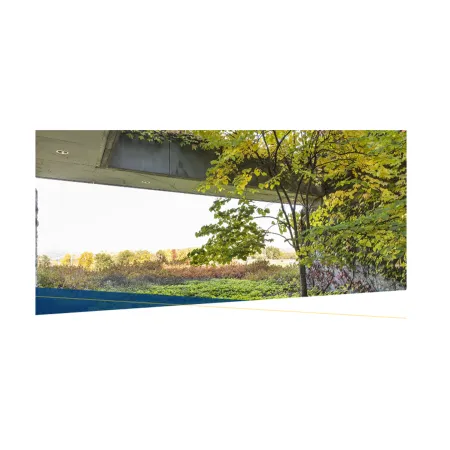
Every part of the text card is optional. If you leave the card heading, card text, and link blank, the component displays as a styled image with a shape accent and no card. This works well as a simple section divider or page break when you only need the visual treatment.
Adding and modifying Hero: Section Intro

Example of the "Hero: Section Intro" component without the card shown.

Example of this component without the card shown.

Image (required): Upload an image from your computer or choose one from the media library. You can add one file only, up to 10 MB, in PNG, GIF, JPG, JPEG, or WEBP format. Images must be larger than 1448x360 pixels so they stay sharp across the full width of the banner. After selecting an image, you will be prompted to add alternative text.

Alternative text (required): A short description of the image used by screen readers and shown if the image fails to load. Describe what the image shows rather than what it represents. For example, "The exterior of the Park Center for Business and Sustainable Enterprise on a cloudy day" rather than "Campus building."

Shape Type (required): Choose the style of the shape accent layered over the image. The options are Angle, Wave, and Curve. This changes the silhouette of the colored shape that frames the banner.

Shape Color (required): Choose the color of the shape accent. The options are Blue Dark, Blue Bright, Blue Light, Gold, Green, and Purple. Pick a color that complements your image and fits the section.

Shape H Position (required): Set the horizontal placement of the shape accent, either Left or Right.

Shape V Position (required): Set the vertical placement of the shape accent, either Top or Bottom.

CTA Card Position (optional): Choose whether the text card sits on the Left or Right side of the banner. This setting only affects the layout when you add card content.

CTA Card Heading (optional, 80 character limit): The bold title displayed at the top of the text card. Keep it short and descriptive. This field supports rich text editing. See the Text component for the full list of formatting options.

CTA Card Text (optional, 130 character limit): A short supporting sentence displayed beneath the heading in the card. This field supports rich text editing. See the Text component for the full list of formatting options.

CTA Card Link, URL (optional): The destination for the card's link. Start typing the title of a piece of content to select it, or enter an internal path such as /node/add. You can also enter an external URL such as https://example.com. Enter <front> to link to the front page.

CTA Card Link, Link text (optional): The visible, clickable text for the link, such as "Learn more" or "Explore the program."

Supported content types:

  • sites,
  • custom landing pages,
  • news articles,
  • academic programs,
  • and academic departments.
Looking for an example?

This component isn't available on standard pages. See it in context at the bottom of the Web Content Demo.