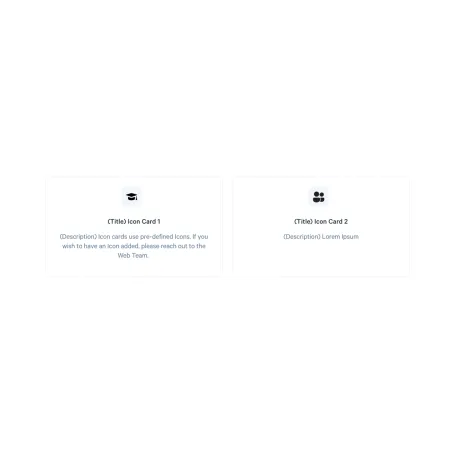
Card: Icon

A compact card led by a simple icon, with a title, short description, and link.

Understanding the Card: Icon

Example of the "Card: Icon" component within a "Collection: Card Grid"

The Card: Icon pairs a simple graphic icon with a short title, a description, and a link. It is a good middle ground between the photo-led Card: Image and the text-only Card: Text, giving each card a small visual cue without the weight of a full photo. Like every card, it lives inside a Collection: Card Grid and sits alongside up to two other icon cards in a row.

What sets the icon card apart is that the icon is not uploaded. You choose it from a set of pre-defined icons managed by the Web Team.

When to use a Card: Icon

Reach for a Card: Icon when a small graphic helps label a set of parallel items and a photo would be too much. Good use cases include:

  • Service or resource quick links, each with a recognizable icon
  • Steps in a process, such as how to apply or how to register
  • Categories or features you want readers to scan and click

If you want a photo to lead the card, the Card: Image is a better fit. If a bold colored button is the goal, use the Card: Info, and if a single number is the point, use the Card: Statistics.

Where the icons come from

The icons are a pre-defined set maintained by the Web Team, and you select one from a dropdown rather than uploading your own. If the icon you need is not in the list, reach out to the Web Team to have one added.


Adding and modifying a Card: Icon

Inside a Collection: Card Grid, click "Add Collection: Icon" to add a card, then fill in the fields below. You can add up to three icon cards, and reorder them with the drag handle on the left of each card.

Collection Heading (optional)

The Collection Heading is the title displayed above the row of cards. Keep it short and descriptive, up to 60 characters.

Subheading (optional)

The Subheading is a short supporting line displayed beneath the Collection Heading, up to 130 characters. It only appears when you have entered a Collection Heading.

Icon (required)

The Icon is the graphic displayed at the top of the card, chosen from the dropdown. The dropdown holds the pre-defined icons managed by the Web Team, so there is nothing to upload.

Card Title (required)

The Card Title is the bold heading beneath the icon, up to 40 characters. Keep it short and descriptive.

Description (required)

The Description is a short line of supporting text below the title, up to 130 characters. It supports rich text formatting; see the Text component for the full list of options.

Link (required)

The Link is required and sets where the card points. Start typing the title of an existing page to search for and select it, or paste an internal path or a full external web address such as https://www.ithaca.edu.

Looking for an example?

This component isn't available on standard pages. See it in context on the Topic Demo page of the Web Content Demo.